Advertisement
WinRAR 7.11 Download for Mac
You are about to download WinRAR, Version ( 7.11 ) for Mac.
Click the button below to start downloading it:
Not working? Report this App.
All you need to know about this download
- Version: 7.11
- Last updated: 04 February, 2026
- Supported OS: macOS
- File Name: rarmacos-arm-711.tar.gz
- File Size: 645 KB
- File Hash Code: 58988a9a0331dc03c8903bb97a446f509075ffe4a1e20a339a3022aeb447a680
- WinRAR 7.11 is scanned using 62 antivirus apps (Check VirusTotal Scan Report)
- After clicking on start download, this application will start downloading from Official Server
- The file is in its Orginal Form. Fileion does not bundle or repack or modify downloads in any way.
Advertisement
Installing Process
How to Install WinRAR 7.11 on Mac: Step-by-Step Guide
1
STEP
1
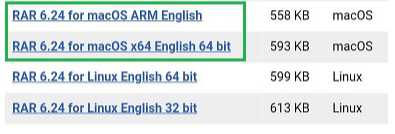
Firstly, download the WinRAR file for MAC.
2
STEP
2
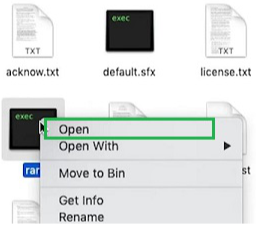
Then, open the package and right-click on the RAR file to open it.
3
STEP
3
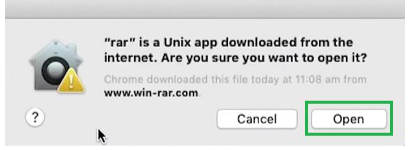
When a prompt appears, press open to continue.
4
STEP
4
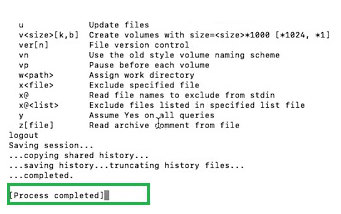
A terminal file will pop up and wait for the process to complete.
5
STEP
5
After the process is completed, you can start using WinRAR on your Mac
Platforms
Also Available for
Alternatives
Also, check the alternatives of WinRAR


Apps
Explore more apps published on Fileion.Com

VidMage
5.0
Trial
Swap faces, not your privacy

TLauncher
5.0
Free
Minecraft Starts Here

Kutools for Excel
5.0
Freemium
Work Smarter in Excel

Safari Browser
5.0
Free
Browse Better, Stay Private

FxSound
5.0
Free
Better Windows Audio Experience

Adobe Premiere Pro
5.0
Freemium
Professional Editing, Simplified
Games


