WinRAR 4.20 Download for Windows 32 Bit , 64 Bit
You are about to download WinRAR, Version ( 4.20 ) for Windows.
Click the button below to start downloading it:
Not working? Report this App.
All you need to know about this download
- Version: 4.20
- Last updated: 04 February, 2026
- Supported OS: Windows XP64 / Vista64 / Windows 7 64
- File Name for 32 Bit: wrar420.exe
- File Size for 32 Bit: 1.45 MB
- File Hash Code for 32 Bit: 16d72d3628ed27331066627a6e8520c127e7d7e876c604a5e8c2773715038890
- WinRAR 4.20 for 32 Bit is scanned using 71 antivirus apps (Check VirusTotal Scan Report)
- File Name for 64 Bit: winrar-x64-420.exe
- File Size for 64 Bit: 1.58 MB
- File Hash Code for 64 Bit: e1039b5051eef12c37200ab0d3e93d407a5027aad6b59ba705526f670f0634b1
- WinRAR 4.20 for 64 Bit is scanned using 72 antivirus apps (Check VirusTotal Scan Report)
- After clicking on start download, this application will start downloading from Official Server
- The file is in its Orginal Form. Fileion does not bundle or repack or modify downloads in any way.
How to Install WinRAR 4.20 on Windows: Step-by-Step Guide
Firstly, download WinRAR on your computer.

Open the file and choose your download destination.
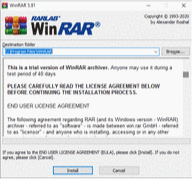
Click on "Install" and when the following prompt appears, click "OK
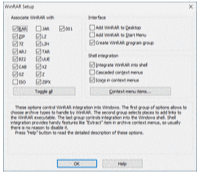
Then, wait until it installs. After it is completed, you can begin using it.
WinRAR for Windows Change Log
Checkout what's new in WinRAR for Windows Version (4.20)
- Enhanced Compression Speed: Significant improvements have been made in both RAR and ZIP compression speed. Users will notice up to three times faster compression and decompression processes compared to previous versions.
- Optimized for Multi-Core Processors: With the increasing prevalence and affordability of quad-core CPUs, WinRAR 4.20 has been meticulously optimized for better utilization of multi-core processors. This optimization results in considerable speed enhancements, especially in multi-core mode. Even single-core mode CPUs will experience notable speed boosts due to improvements in RAM utilization and CPU efficiency.
- RAR Compression: The primary focus of this version's development has been to enhance the efficiency of RAR compression. Through the utilization of more RAM and CPU improvements, RAR compression speed has been significantly increased. Depending on the data type, RAR compression can be up to twice as fast as in previous versions, with poorly compressible data such as .jpg and .mp3 experiencing up to three times faster compression.
- ZIP Compression: The ZIP compression code has been rewritten to employ similar techniques as RAR compression. As a result, WinRAR 4.20 achieves faster ZIP compression speeds compared to WinRAR 4.11, even in single-core mode. Multi-core support further enhances ZIP compression speed, with potential improvements of up to three times faster compared to the previous version.
- Recovery Function Optimization: The final version of WinRAR 4.20 introduces optimizations in recovery functions, leveraging multiple-core processors to expedite file repair processes. This enhancement translates to significant time savings when repairing damaged or corrupted files.
- Continued Advantages of RAR Format: The RAR format maintains its superiority by offering various advantages such as archiving, conversion, security, and recovery functions. With WinRAR 4.20, these advantages are further optimized to meet or exceed the needs of the global user base.
- Bug Fixes and Additional Improvements: Various bug fixes and enhancements have been implemented to ensure a smoother user experience. These improvements contribute to the overall reliability and efficiency of WinRAR 4.20.
Also Available for
Also, check the alternatives of WinRAR


Explore more apps published on Fileion.Com

VidMage
Swap faces, not your privacy

TLauncher
Minecraft Starts Here

Kutools for Excel
Work Smarter in Excel

Safari Browser
Browse Better, Stay Private

FxSound
Better Windows Audio Experience

Adobe Premiere Pro
Professional Editing, Simplified


